
The journal · Entry 07
What the LinkedIn graphics are missing
Three tools, three jobs, and the question most cheat sheets are skipping.
I think the LinkedIn graphics are missing something. Here’s my take.
You’ve seen them. We all have. Chat versus Cowork versus Code, three columns, a few bullets in each, someone has created a beautiful little cheat sheet for which Claude tool to use when. They’re extremely useful. I’ve saved quite a few myself.
But most of them are framing the choice as if it’s about scope. Small thing? Chat. Document? Cowork. Build? Code. And that’s not wrong. Just not the question I’m actually asking myself when I’m sitting down to do the work.
The real question for me, before I decide what tool to pick up, is how done is my thinking.
the question that actually decides it
When I open Claude, the thing determining which tool I reach for isn’t the size of the build. It’s how clear I am on what I’m trying to do.
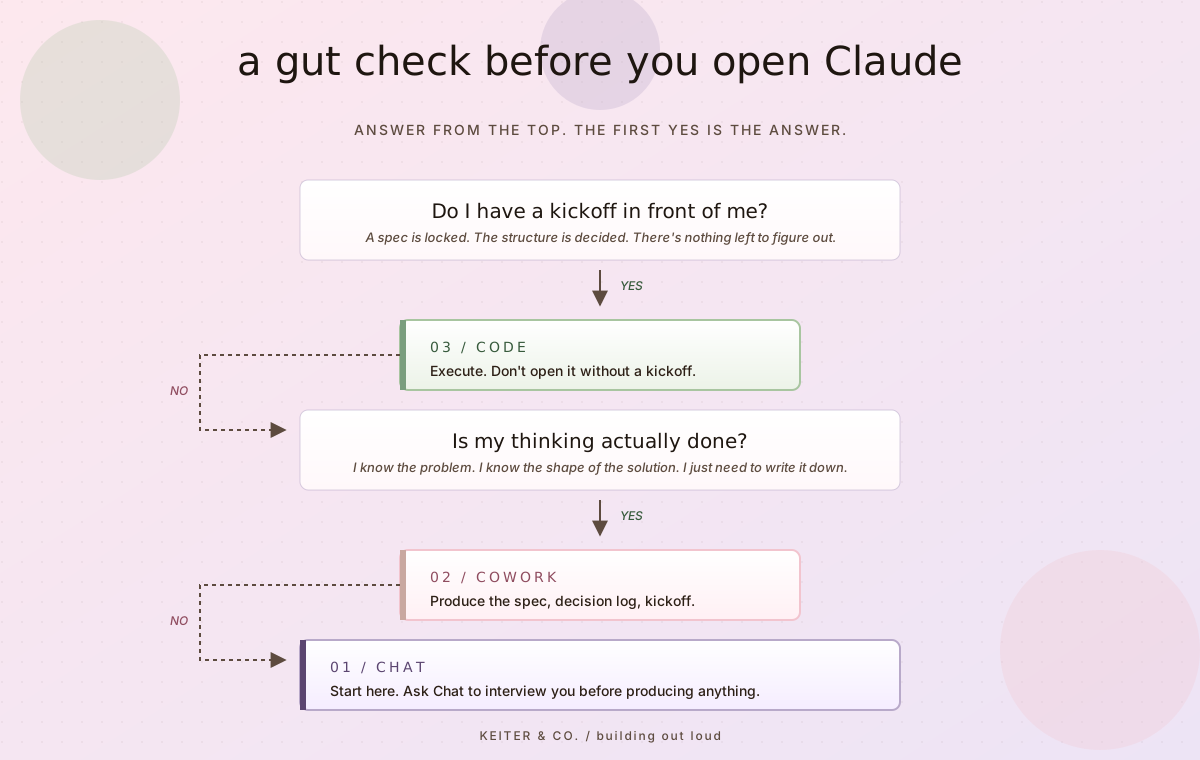
If my thinking is fuzzy, or I haven’t fully answered the question of what problem this is solving, I start with Chat. If I don’t know if the thing I’m trying to build is even possible, or I have an idea but I’m not sure how the pieces are going to fit together, or I’m working through a problem and I just don’t know what the answer looks like yet, Chat is for that. It’s a thought partner. The job is to figure out what I’m even building before I try to build it.
This is where the tips I’ve talked about in past entries (entry 03 and 04) actually start paying off. Starting a project so Chat has the right context. Asking Chat to interview me before producing deliverables, so it understands what I’m trying to do before it tries to help me do it. Those tips aren’t just about getting better outputs. They’re what makes Chat a real thought partner instead of a fancy autocomplete. And once Chat is doing that job well, choosing which tool to reach for next gets a lot easier.
Once my thinking is solid, I go to Cowork. I know what I want. I know what problem I’m trying to solve. The intake conversation is over. The idea has been worked through. The project is far enough along that I don’t need help thinking anymore. I need help planning. Producing decision logs, specs, kickoff prompts, structured documents that turn a clear idea into a clear plan. Cowork is for that working mode.
Once the spec is real, I go to Code. By the time I’m in Code, the thinking is totally done. The structure is done. The kickoff is in front of me. Code’s job is to execute, not to figure out what I want.
Worth a quick aside here, because I have a tendency to ramble and I want to land this one without the ramble. The short version of why spec-driven engineering is my chosen methodology over prompt engineering: you don’t get the same quality of output, as fast, with fewer tokens, using prompt engineering. The rework eats you alive. Spec-driven means doing the thinking once, writing it down, and letting every prompt after that operate inside the context the spec already set. The prompts get to be short and tactical because the spec did the heavy lifting upstream. That’s the whole game.
the cheat sheet
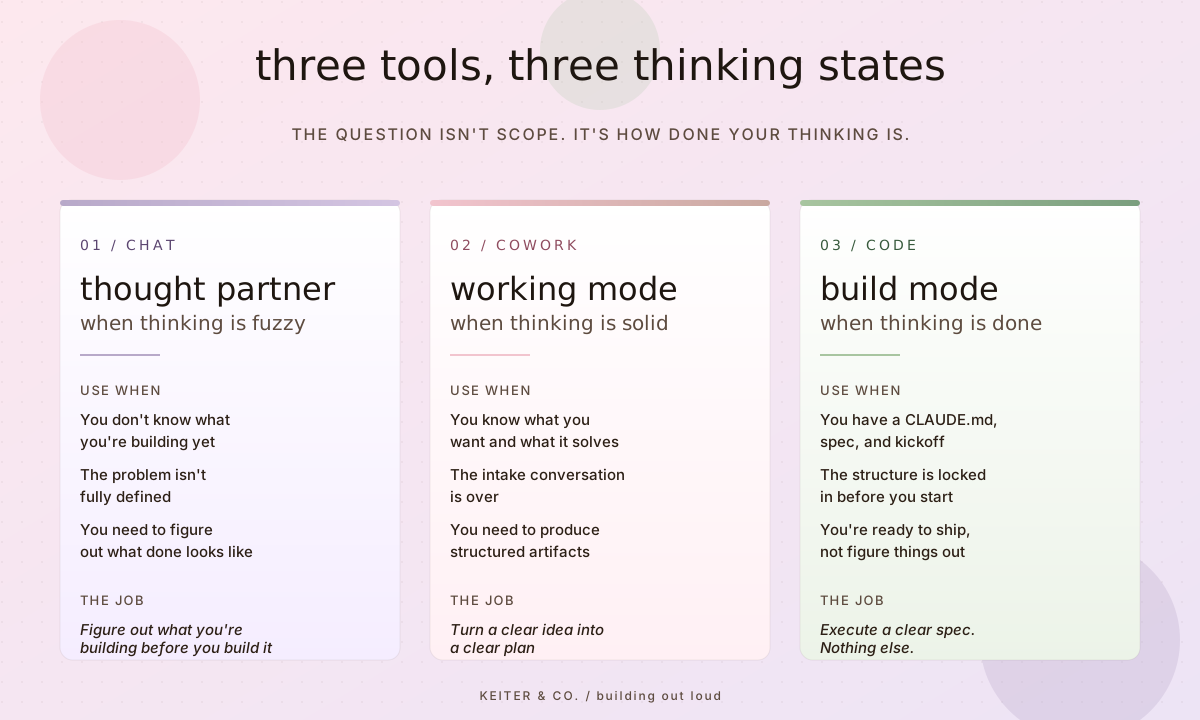
That’s the whole thing. Three tools, three thinking states, one job each.
The reason this matters is that each tool only does its best work when you don’t ask it to do the other tools’ jobs. Chat is a great thought partner and a mediocre document producer. Cowork is great at producing once the thinking is done and not great at being a thought partner from scratch. Code is excellent at executing a clear spec and very bad at building one for you.
The graphics that say “Chat for small, Cowork for medium, Code for big” miss this. You can absolutely use Chat for big things if your thinking is fuzzy. You can use Cowork for small things if you’re producing something specific. The size doesn’t decide. The thinking state does.
chat as thought partner
Most of my Chat time is spent figuring out what I’m doing. Is this a real problem? What would actually solve it? What would the shape of the solution look like? What am I missing?
I do most of my two-pass refinement in Chat. Pass one in one chat, pass two in a fresh one. It’s cheap on tokens, fast, and the second pass almost always catches something the first pass missed. (I built a whole entry on this for 05. The boring part is load-bearing. It really is.)
One thing worth naming: Chat inside a Project is a different tool than fresh Chat. The project I have for Keiter & Co. carries a long, specific instruction set. Standing principles, voice rules, build standards, hard-stops on em dashes and AI language, the whole operating posture of the business. When I open a Chat inside that project, I’m not starting from scratch. The thought partner already knows the business.
That changes what Chat is good for. Outside a project, Chat is a fresh thought partner with no context. Inside a project, Chat is a thought partner that already knows how I work and what the business is. Both are useful. They’re different tools.
cowork as working mode
When the thinking is done, I take it to Cowork. This is where I produce the artifacts that turn an idea into something you can actually build from. Decision logs, specs, kickoff prompts, structured documents.
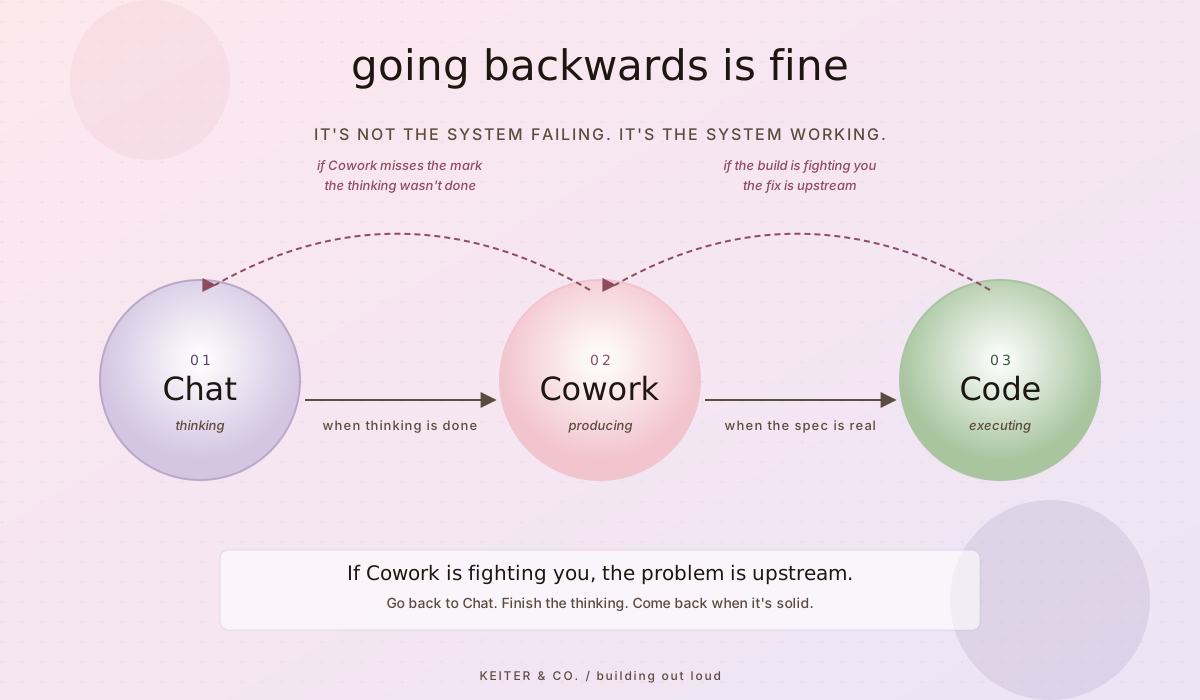
I don’t double-pass in Cowork. The token cost is real, and more importantly, if a Cowork output misses the mark, the answer usually isn’t to iterate on it. The answer is to scrap it and go back to Chat, because if Cowork missed the mark, the thinking probably wasn’t as done as I thought.
That’s the move. If Cowork is fighting you, the problem is upstream. Go back to Chat, finish the thinking, come back when it’s solid.
code as build mode
By the time I’m in Code, I’m not figuring anything out. I have a CLAUDE.md, a spec, and a phased kickoff. The thinking happened in Chat. The structure happened in Cowork. Code’s job is to ship.
I do most of my building through Claude Code in VSCode chat, not the Claude Code GUI. The methodology I use for builds (decision log, spec, kickoff, phase prompts, handoff notes between phases, BUILDNOTES.md at the end) is published in full at github.com/oliviakeiter/olivia-keiter-build-methodology if you want the receipt.
The point of all of that structure is to keep Code focused on executing. When the build is fighting me, it’s almost never a Code problem. It’s a thinking problem or a spec problem. The fix is upstream, not in the build session.
tips and tricks from actually using them
A few things I’ve picked up that the cheat sheet doesn’t capture. Some of these I’ve mentioned before in past entries. There’s a reason I’m saying them twice.
Going backwards is fine. There’s no shame in it. I’ve started in Cowork and realized the thinking wasn’t done. I scrapped the project and went back to Chat. That’s the system working, not the system failing. If the answer Cowork is producing isn’t landing, that’s information. The thinking wasn’t as done as I thought.
Project context changes what Chat can do. Every time I accidentally start a chat without the Keiter & Co. project attached, I can tell immediately. The thought partner is suddenly thinking from scratch instead of thinking from inside the business. If you’re using Chat regularly for a specific kind of work, build a project for it with a real instruction set. Not a one-line description. The difference between Chat with project context and Chat without it is enormous.
Name your chat threads. This one is on my list of things to start doing. I don’t do it as often as I should. I bounce between personal projects, Keiter & Co. work, and AI consulting thinking, and right now my chat history is a wall of Claude-chosen names that don’t match my thinking. Naming the thread the moment I start it would lower my cognitive load and let me pick back up faster. Putting this here partly because it belongs in the entry and partly so I have a public record of saying I’d do it.
Ask Chat to interview you before producing anything. The intake conversation is the work. If I’m in Chat and I want a real output, the first thing I do is ask Chat to ask me questions until it understands what I’m actually trying to do. Then I let it produce. The quality of the output is downstream of the quality of the intake.
Don’t open Code until you have a kickoff. If you’re opening Claude Code without a kickoff in hand, you’re using it as Chat. That’s a tool mismatch. Step back to Cowork, write the kickoff, then come back. Code’s job is to execute. If there’s nothing to execute, you’re in the wrong tool.
Two-pass refinement is a Chat move, not a Cowork move. Pass one in one chat, pass two in a fresh one. It’s cheap on tokens and almost always catches something. I don’t do this in Cowork because the token cost is real and because if a Cowork output misses the mark, the answer is upstream, not iterative. Different tools, different refinement strategies.
The handoff between tools should be intentional. Don’t drift. Decide. “I’m done thinking, I’m going to Cowork now” is a different mental state than “I guess I’ll start writing this somewhere.” The clearer you are about which stage you’re actually in, the cleaner the handoff and the better each tool gets to do its job.
what this has actually unlocked
I want to be specific about why this matters, because the abstract version isn’t very useful to me.
This workflow is what let me build a business in a day. The entire Keiter & Co. setup, the agent fleet, the live sites, all of it, happened because I knew which tool to reach for at which moment. I didn’t try to do the thinking in Code. I didn’t try to do the building in Chat. I matched the tool to the stage and moved.
This workflow is what let me go from a CRM evaluation interview to Strata, a working production system with a full agent fleet, in 25 hours. Same reason. The thinking happened in Chat, the architecture happened in Cowork, the build happened in Code, and none of those tools had to do work they weren’t suited for.
This workflow is what produced the Keiter & Co. methodology document and the project instruction set behind it. Both of those are themselves outputs of the workflow. I thought through what I needed in Chat. I produced the documents in Cowork. They live in Code as the foundation for every build I run.
The graphics are right that the three tools do different things. The thing they’re missing is that the value isn’t in knowing what each tool does. The value is in matching the tool to the state your thinking is in, so each one gets to do its actual job.
That’s the unlock. Each tool gets to focus, because you stopped asking the wrong tool to do the work.
What I’m already thinking about for the next entry: prompt engineering vs spec-driven engineering, why they both have a place, and why I lean the way I do. More soon.
find me on LinkedIn if the vibes feel right: linkedin.com/in/oliviakeiter


Stay in the loop
Get the next entry.
New notes land in your inbox when there is something worth reading. No cadence, no filler.
Powered by Buttondown. One click to unsubscribe, always.